Showing posts with label NSF. Show all posts

Tuesday, December 28, 2010

How to find broadcast storm have on the Nortel Switched Firewall Accelerator NSF 6616 or 6614?

Symptom:
VRRP log messages indicating the Accelerators are changing from BACKUP TO MASTER.
       NOTICE: Accelerator 00:60:cf:ae:08:00's vrrp status changed to MASTER
Default gateways are reported as down or not in use
    Default gateway 1 (192.168.0.1) is down
Acceleration is switching from on to off to on again
     CRITICAL: Acceleration Status changed from ACCELERATING to NOT ACCELERATING


Cause:
Broadcast packets are not handled by the SPs.  Instead, broadcast packets get forwarded to the MP for processing. A broadcast storm can bring the MP to 100% utilization.  When the MP is running at 100% dealing with the Broadcast packets, it will not be able to send VRRP updates, default gateway health checks, accelerator health checks, and others and so on.


Problem Resolution


Fix:
The first step is to determine that you are under a Broadcast Storm.
1) Check the port Stats by running /stats/port #/if on the Accelerator.  Here is the output

Interface statistics for port 3:
                    ifHCIn Counters       ifHCOut Counters
Octets:                            0                      0
UcastPkts:                      1019                  0
BroadcastPkts:              12602991             0
MulticastPkts:             78065             0
Discards:                        566                     0
Errors:                             0                0
ifInUnknownProtos:                0

In the above capture, you will see the BroadcastPkts count is much higher than the UcastPkts or the MulticastPkts.  Normal traffic typically has the Ucast as the highest count.

2) You can also check the MP Stats at the time of the attack with the /stats/mp/cpu command.  Here is a sample output showing the MP at 100% utilization.

>> MP-specific Statistics# cpu
------------------------------------------------------------------
CPU utilization:
cpuAUtil1Second:            100%  cpuBUtil1Second:           100%
cpuAUtil4Seconds:           100%  cpuBUtil4Seconds:          100%
cpuAUtil64Seconds:          97%   cpuBUtil64Seconds:         98%

3) Determine the source of the Broadcast Storms.  Set up a Sniffer on the suspected port and look for broadcast packets.  Broadcast packets do not have IP addresses, only source and destination MAC. In a Broadcast packet, the destination MAC is FF:FF:FF:FF:FF:FF

4) When the source is determined, you will need to troubleshoot the offending device to find out why it is sending a Broadcast Storm

Tuesday, May 25, 2010

Nortel Switched Firewall default root password

Nortel Switched Firewall default root password is "ForgetMe"

Saturday, May 22, 2010

How to configure RSA SecureID for SSH on NSF / Nortel Switched Firewall / Alteon 5111 / 5109 / 5106 / any 5100 series / NSF 6616 / 6614 series???

Configure RSA SecurID for Nortel Switched Firewall / Alteon Firewalls..


Note : This configuration is supported only on the version 2.3.6 and 4.1.4 release onwards.
CLI for NSF 5100 series firewalls
A new set of CLI commands are added for enabling/disabling SecurID authentication on
NSF 5100 series firewalls.
>> Main# /cfg/sys/adm/securid/
------------------------------------------------------------
[SecurID Authentication Menu]
ena - Enable SecurID Authentication
dis - Disable SecurID Authentication
interface - Set SecurID Interface Index
download - Download SecurID config file [floppy/usb/tftp/ftp/scp/sftp]
All command will be in effective once you apply only.
/cfg/sys/adm/securid/ena – to enable the securID authentication for SSH.
/cfg/sys/adm/securid/dis – to disable the securID authentication for SSH.
/cfg/sys/adm/securid/interface – This command is used to add the Interface index
number from where the firewall will be talking to RSA server.
/cfg/sys/adm/securid/download – with this command you can download sdconf.rec file form FTP or other device as mentioned in Admin Guide.
CLI for NSF 6000 series firewalls
A new set of CLI commands are added for enabling/disabling SecurID authentication on
NSF 6000 series firewalls.
>> Main# /cfg/sys/adm/securid/
------------------------------------------------------------
[SecurID Authentication Menu]
ena - Enable SecurID Authentication
dis - Disable SecurID Authentication
server - Set SecurID server configuration
download - Download SecurID config file [floppy/usb/tftp/ftp/scp/sftp]
/cfg/sys/adm/securid/ena – to enable the securID authentication for SSH.
/cfg/sys/adm/securid/dis – –to disable the securID authentication for SSH.
cfg/sys/adm/securid/server –add the IP address of the
ACE server.
/cfg/sys/adm/securid/download – – with this command you can download sdconf.rec file form FTP or other device as mentioned in Admin Guide.

How to configure RSA SecurID for Telnet / http / https / telnet and SSH on NSF / Nortel Switched Firewall / Alteon 5111 / 5109 / 5106 / any 5100 series / NSF 6616 / 6614 series???

Configuring RSA SecurID configuration for Nortel Switched Firewall / Alteon for http, https, telnet and ssh services.

-->
This is possible by configuring your RSA SecurID server in RADIUS server mode.
Note : Once you configure RADIUS on your firewall gateway, all local username password will be override with RADIUS users including local admin authentication will be redirected to RADIUS server.
Steps to configure the RSA SecurID server :
Install RADIUS component on your SecurID server.
Add the authentication client to your RADIUS server using RSA SecurID RADIUS service console.
Steps to configure the Firewall Module:
Add the RADIUS server using port number UDP 1645.
Make sure that the fallback option is enabled.

Wednesday, May 19, 2010

How enable root access on Nortel Switched Firewalls?

--> How enbale root access for Nortel Switched Firewalls?
Enabling root access for Nortel Switched Firewalls :
Generated a private and public keys using PuttyGen.


Enter the password and save the private and public keys as shown below :


Then login to Nortel switched Firewall using CLI and then create Advance user and add public key to the user created and then enable the user as shown below :

>> SSH Users# pwd
/cfg/sys/user/adv

SSH Users# .

------------------------------------------------------------
[SSH Users Menu]
      user       - SSH User Admin Menu

 SSH Users# user
Enter user name: user1
Creating SSH User user1

------------------------------------------------------------
[SSH User user1 Menu]
      name       - Set Full name of User
      pubkey     - Set RSA/DSA Public Key for User
      ena        - Enable User Account
      dis        - Disable User Account
      del        - Remove SSH User

 SSH User user1# ena

 SSH User user1#
SSH User user1# pubk
Current value: none [AAAAB3NzaC1yc2EAAAABJQAAAIBvHMOHRmoeQawNAUl5hMbEJ37xsyLn55vPhBFD]
Enter RSA/DSA public key for user: ssh-rsa AAAAB3NzaC1yc2EAAAABJQAAAIEApSFofqqzTufUwtj1KDzRtU5rGWcUoQUK7oNamyiWzv6nXp6Hw4/WL49l2zKaO6InuMAJnQL+PS1lmyXwh3mP1oOl7Tvt9U3F23iKihayyoVdVM/m5vKXSAQMRHzLHOhtdBhbyOlDZkkBu8v4rbtJUzw4R2TxFg3B3UaOuq2VlU8= rsa-key-20090526

 SSH User user1#

Now Connecting to Nortel Switched Firewall :


Initial steps to configure Nortel Switched Firewall Gateway

Initial setups to configure Nortel Switched Firewall Gateway :
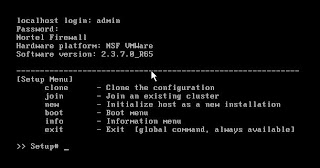
Login with default username and password.


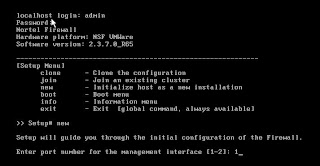
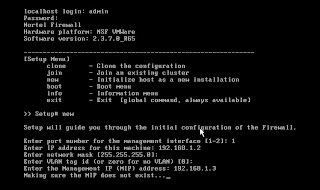
Enter new to create new Nortel Switched Firewall Gateway and select the interface from where management server is reachable.


Then provide network details as shown below. Nortel Switched Firewall Gateway management ip address can be in different subnet but ensure that same is routed properly.


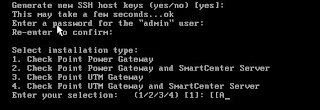
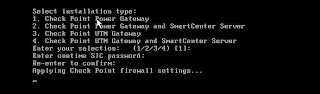
Please select your type of installation as show below :


If it is distribute without UTM features select option 1, or if it is with UTM select 3.
If it is stand alone without UTM then select 2 or with UTM select 4.
If it is distribute setup please enter SIC (onetime) password as shown below:

How to install Nortel Switched Firewall 5000 series image on vmware??

--> Create virtual machine first as below :
Operating system – Redhat Linux
RAM : 512MB
Interface: As required for testing.
Delete SCSI hard disk and add IDE with 40GB disk space.
Then boot with CD / CD image.
Login as root and enter the following command:
Install-nsf nsf-vmware
Once installation is done you can start working on that for only test / learning purpose.
It is not recommended to use this setup on production environment.

Default Nortel Switched Firewall username and password?

Username : admin
Password : admin

Running tcpdump / packet captures on on Nortel Switched Accelerated Firewalls

Please find syntax to run tcpdump on NSF :


Below command applies to 6000 / 5000 series:
<-i> <-w>

tcpdump -i i11 "host 192.168.1.35" -w /var/dnsissue.trace
you can stop the trace with ctrl+c

Below command applies to only 6600 series:

asfcapture -11 -f "host 192.168.1.26"

you can stop the trace with ctrl+c